Take screenshots from a movie with a single click

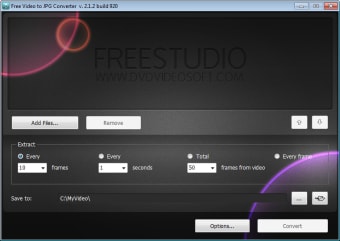
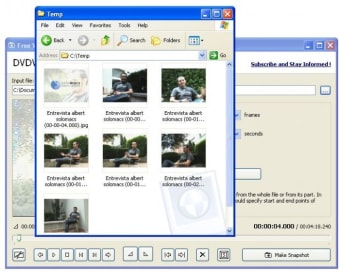
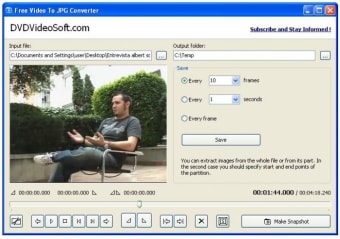
Free Video to JPG Converter enables you to take screenshots of a given video while you're playing it on the program's built-in player. The whole process is extremely easy: select the video, browse to the scene you're interested in and take as many screenshots as you want.

Top Recommended Alternative

The good thing about Free Video to JPG Converter is that it allows you not only to take single screenshots (by clicking on the "Make snapshot" button) or pressing the S key) but also take multiple screenshots by selecting any of its automatic saving options. Also, there's the possibility of trimming the video so that you take screenshots only from a certain fragment.

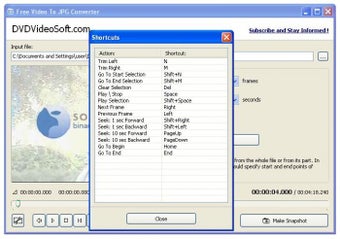
On the downside, I missed having more configuration options, such as being able to choose the picture format, customize keyboard shortcuts or choosing a naming pattern for the screenshots.

An easy-to-use, effective tool to convert your favourite movie scenes into pictures.

  • Pros

    • Can take multiple screenshots automatically
    • Enables you to trim the video and select a fragment to capture
  • Cons

    • Few configuration options
 0/4

App specs

Program available in other languages


User reviews about Free Video to JPG Converter

3.3

2 reviews

Add review

Main reviews for you

  • Anonymous user

    The new version is much better than the old one. I've been using the FreeStudio package containg this program for more than year. I've recently take a look to the latest version of the VideoTo jpg and can say it has become much more user friendly.

  • Anonymous user

    There are better alternatives. Last year I looked around for programs like this. I wanted to have 1 picture containing generated thumbnails from a moviefile. I came across "ImageGrabberII" which does this, also in batch-method, which is great. This program is very buggy though. Free Video To JPG converter is a nice idea, but for me misses some keyfeatures. Pros: Nice interfaceQuick to understand Cons: No batch methodNo thumbnail generator

More

You may also like

Alternatives to Free Video to JPG Converter

Explore Apps

Latest articles

Laws concerning the use of this software vary from country to country. We do not encourage or condone the use of this program if it is in violation of these laws.
Softonic

Is Free Video to JPG Converter safe?

98/100

Score result: Clean

This file passed a comprehensive security scan using VirusTotal technology. It is safe to download.
  • Virus free
  • Spyware free
  • Malware free
  • Verified by Security Partners

    VirusTotal logo

Scan Info

Last scan
Wednesday, July 10, 2024
Scan provider
VirusTotal · Full report

File Integrity

File
Free_Video_to_JPG_Converter_V5.2.3.112.exe
SHA256
82a915fa57b82ce4d5135b208b343ceb5f5225070da80e8636b67e182c667505
SHA1
0c26c32db23318f60c3140f8b4151a68ca5ec472

Softonic security commitment

Free Video to JPG Converter has been thoroughly scanned by our advanced security systems and verified by industry-leading partners. This file comes from the official developer and has passed all our security checks, showing no signs of viruses, malware, or spyware. For more information, visit our Security and Trust Center